

Website Redesign Cost and Checklist: What to Settle First
What a redesign costs depends on what changes, and the change that lasts is how the site is built. This guide uses sourced figures, explains when to fix, refresh or rebuild, shows how to read a quote, and lists what to settle first so you keep your rankings.
You Have Been Told You Need a Redesign
Maybe the site looks dated next to a competitor's. Maybe leads have slowed. Or the person who built it has moved on, and nobody can edit it without breaking something. Either way, the word "redesign" is on the table, and quotes are starting to come in.
They will not agree with each other. Clutch, which publishes pricing from verified client reviews, says web design agencies typically charge anywhere from $2,000 to $100,000. And a redesign done carelessly can cost something no quote shows: the search traffic the old site spent years earning.
Many of those sites were assembled in a page builder like Wix, Squarespace, Elementor or Divi. Give one a new coat of paint, and it usually hits the same wall a few years later. So before comparing prices, it helps to decide what you are actually paying for: a new look, or a site that is built differently.
The Short Answer
- Most projects cost less than people fear, and some cost far more. In Clutch's 2026 pricing guide, the average web design project was $38,105, but most cost under $10,000. US agencies charged around $100 to $149 an hour.
- The real decision is how the site is built. Re-skinning a site that was dragged together in a page builder repaints the same ceiling. Rebuilding it on a designed system of templates removes it, and AI-assisted development has made that more affordable than it has ever been.
- Price follows scope. Content writing, photography, integrations and moving old content are what make two quotes for the "same" site so different.
- The biggest hidden risk is search traffic. If page addresses change, every old URL needs a permanent redirect to its match. Google recommends keeping them for at least a year.
- Settle five things before design starts: the goal, your baseline numbers, what content stays, who will edit the site, and the redirect map.
Built, Not Dragged
What is a website redesign? Strictly, it is any project that changes how a site looks and works. The part that decides whether it lasts is how the site is built.
In a page builder, every page is assembled by hand. Someone drags blocks onto it, sets the spacing, and repeats the work on the next page. That is quick at first. But each new page is another copy to keep consistent. An edit in the wrong place can shift the layout. And the site can only do what the builder's blocks allow. A new design built the same way inherits all of it.
A site built in code works the other way around. The design is made once, as a system of page templates and components. The team fills in fields for a new service, a team member or a project. The layout takes care of itself. Nothing can be dragged out of place, and the site can do whatever the business needs, because nothing is limited to a block library.
Here is the same everyday edit, done each way.
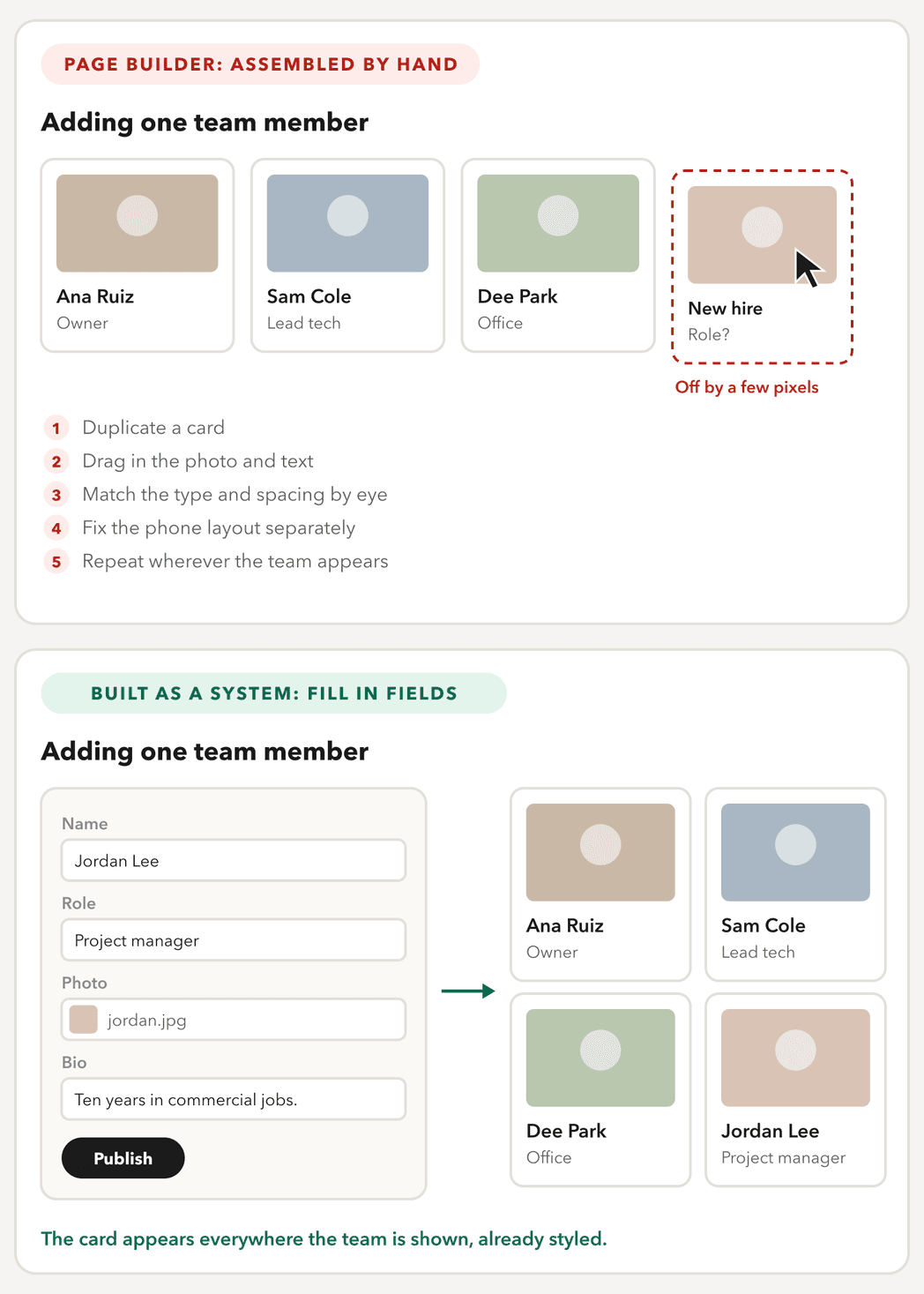
The first takes the same care every time, and it drifts a little with every edit. The second takes a minute, and it cannot drift.
That used to be the expensive route, which is why so many small businesses ended up in builders. AI-assisted development has changed that. Nowadays I build every site this way: custom WordPress themes, Next.js, and Framer or Webflow set up as a system rather than assembled page by page. How the common platforms compare.
Fix, Refresh or Rebuild
Three different projects get called a redesign, and knowing which one you need is the biggest decision in the budget.
| Fix | Refresh | Rebuild | |
|---|---|---|---|
| What changes | A few pages: their words, speed or forms | The look: type, color, layout and photos | How the site is built, its structure, and often the URLs |
| Use it when | The site works, but some pages do not | The site is already built on a solid system, and only the look has aged | It was dragged together in a builder, editing breaks things, or it no longer matches the business |
| Risk to search traffic | Low | Low, if the URLs stay the same | Highest, because URLs change, so it needs a redirect map |
A fix is the option most people skip. A slow page, a broken form, or a services page that no longer matches what you sell can often be solved in days. A new look will not solve a message problem either. If visitors do not understand what you offer, the same words in a new layout will not help.
A refresh only makes sense when the foundation underneath is worth keeping. If it was dragged together in a builder, a refresh spends the budget on a site that will hit the same limits again. That is when a rebuild is the better use of the same money.
What a Website Redesign Costs
Ask five designers what a redesign costs and you will hear five numbers. Most of the ranges published online come from agencies describing their own projects, with no source behind them. A steadier reference is Clutch, a directory that collects verified client reviews. Its pricing guide, updated in September 2026, reports:
- The average web design project cost $38,105, though Clutch notes that a few large projects pull the average up.
- Most projects cost less than $10,000.
- The average project ran seven months.
- Hourly rates ran $100 to $149 at US agencies. Agencies working on Wix, WordPress, Squarespace, Webflow or Shopify charged $25 to $49.
These figures cover projects of every size, not only redesigns. So the honest answer is that cost follows scope. Here is what moves it.
- Page templates. The number of distinct page designs matters more than the page count. Ten service pages on one template cost far less than ten different layouts, which is also why a designed system costs less to grow.
- Content. Who writes it, and how much. It is the most underestimated part of a redesign, and often the slowest.
- Photography. A new shoot, licensed stock, or what you already have.
- Integrations. Booking, payments, donation forms and connections to the tools you already use.
- Migration and redirects. Moving the old content over and mapping every old URL to its new home.
After launch, a site keeps costing something every year. These are typical examples, each priced at the vendor's own page in October 2026.
| Recurring cost | Example | Price |
|---|---|---|
| Domain | A .com at Porkbun | $11.08 a year |
| Hosting | Budget shared hosting to managed WordPress | About $3 a month at Hostinger, to $28 a month at WP Engine, billed annually |
| Premium plugin | Yoast SEO Premium, one site | $118.80 a year |
| Stock photos | Adobe Stock, 10 assets a month | $29.99 a month, on an annual plan |
Hostinger's price is for a four-year plan and renews at $10.99 a month.
The build also changes what you pay for over time. A builder site is rented: the subscription runs for as long as the site exists, and nothing comes with you if you leave. A site built in code pays only for hosting, and you own all of it.
| Wix or Squarespace | Built in code | |
|---|---|---|
| Running cost | A subscription: $17 to $159 a month on Wix, $19 to $99 on Squarespace | Hosting: about $3 to $28 a month |
| What you own | Nothing you can take on Wix; part of the content on Squarespace | The whole site |
| The cost of leaving | A rebuild | None. The site moves with you |
Builder prices are billed annually, as listed in October 2026. The full comparison.
How to Read a Redesign Quote
The simplest way to compare quotes is to ask every designer for the same thing: an itemized scope.
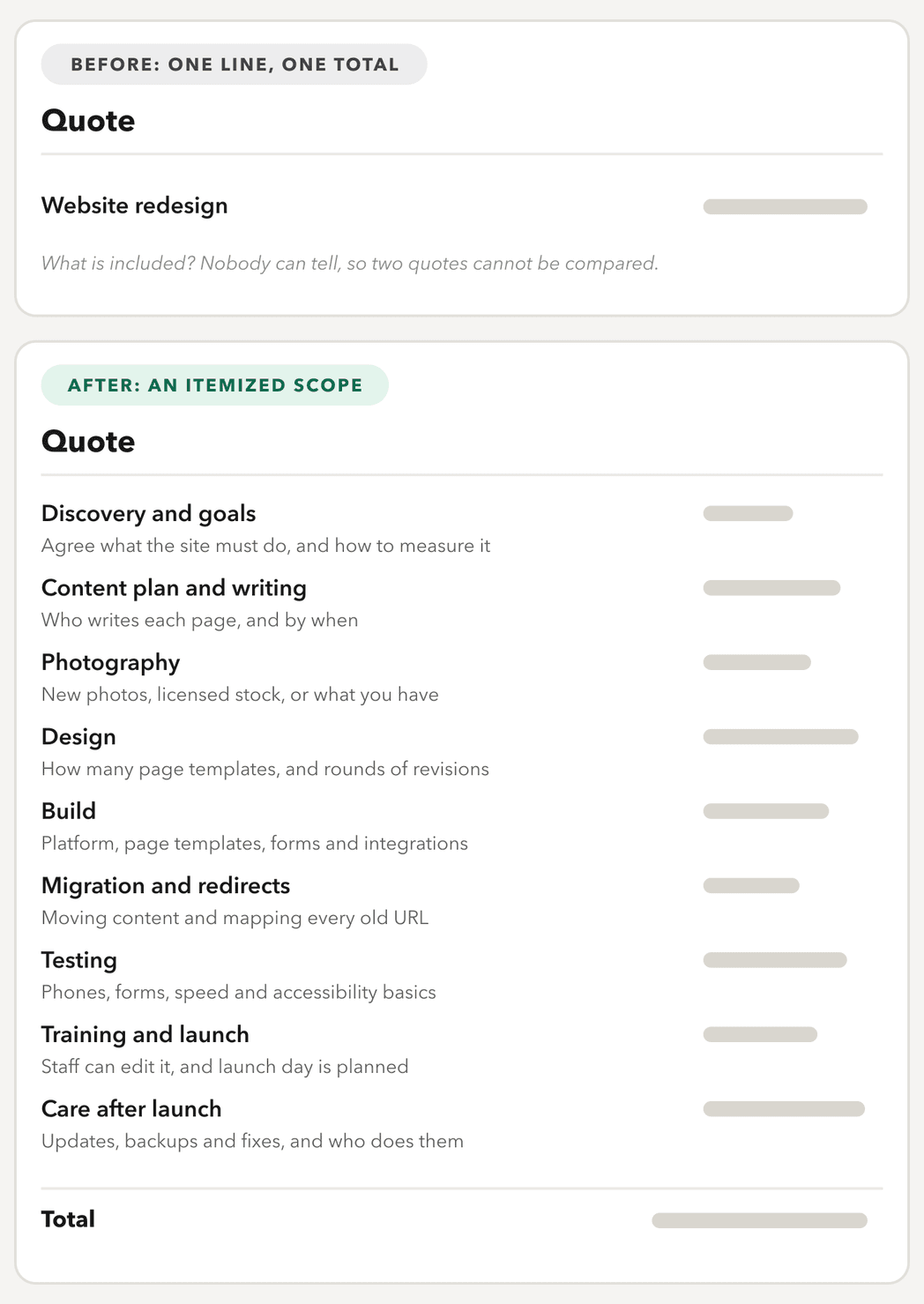
A one-line quote cannot be compared with anything. You cannot tell what is included. So a lower number might mean less work, or work moved back to you.
An itemized scope shows exactly what each designer is doing. Look hardest at three lines, because they are the ones most often missing:
- Content plan and writing. If nobody is named, the writing is yours.
- Migration and redirects. If it is not there, ask how the old pages will be handled.
- Care after launch. Updates, backups and fixes have to come from someone.
A quote without these lines is not cheaper. It has quietly handed that work back to you.
The Website Redesign Checklist: What to Settle First
Most redesigns that go over budget do it for the same reason: decisions made after design has started. Each of these is cheaper to settle on paper.
- Name the goal, and how you will measure it. More calls, more bookings, fewer support emails. One sentence that everyone agrees on.
- Record your baseline. Before anything changes, export three things from Google Search Console: the pages that earned clicks over the last 12 months, the searches behind them, and the sites linking to you, from the Links report. Then note your monthly leads or sales from Google Analytics. Without a before, there is no after.
- Inventory the content. For every page, decide whether to keep, merge, rewrite or retire it. The pages that earn search clicks get the most care.
- Decide who edits the site, and what they change. List the things your team updates, like services, staff or projects. Those become fields in the new templates.
- Decide how it will be built. If the current site was dragged together in a builder, changing that is usually the point of the redesign.
- Map the redirects. If any address changes, decide where each old URL goes before launch. More on this below.
- Plan the content. Writing and photos are usually what slows a redesign down. Give them owners and dates early.
- Plan the launch. Keep the new site out of search until launch day, test every form on a phone, carry analytics over, and submit the new sitemap in Search Console.
Protecting Your Search Rankings
This part of a redesign never shows up in a mockup. It is also where most of the lasting damage happens, especially when a site leaves a builder and its addresses change. When an address changes, Google treats the new URL as a new page, unless the old one points to it.
Google's own guidance for moving pages is specific:
- Use permanent redirects. Google recommends "HTTP permanent redirects if possible, such as 301 and 308," and says to avoid chains of redirects.
- Keep them for a long time. Google's guidance is "generally at least 1 year."
- Never send everything to the homepage. Google warns against redirecting many old URLs to one irrelevant page, which "might be treated as a soft 404 error."
- Retire pages on purpose. A page you are removing for good should return a 404 or 410.
- Change one thing at a time. Moving to a new domain and launching a new design at once makes problems harder to trace.
- Expect some movement. Google says to expect "temporary fluctuation" in rankings during a move.
Here is the difference, using a fictional plumbing company's pages.
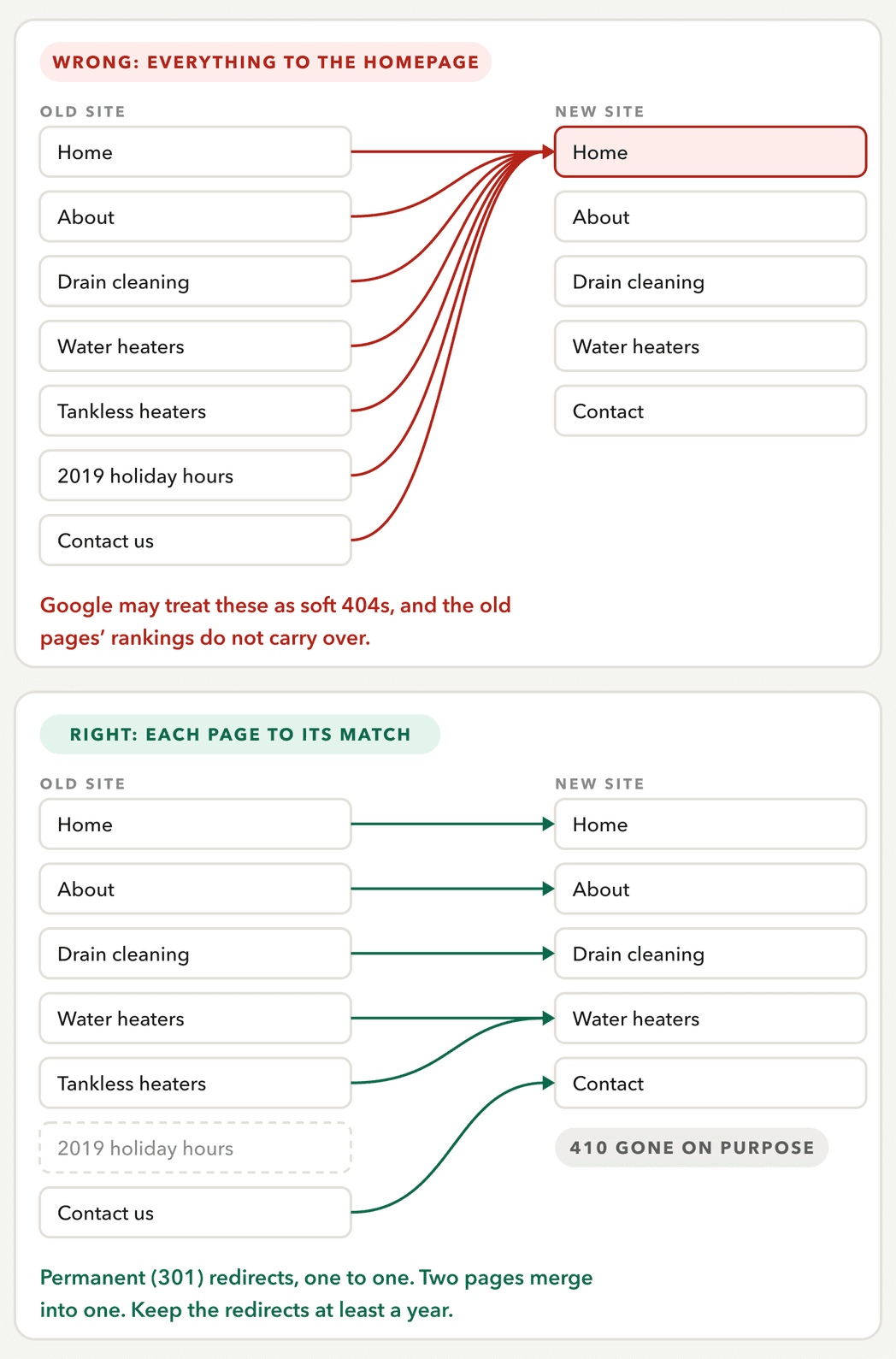
On paper, the redirect map for the right version is a simple table. Every redesign that changes URLs should have one, signed off before launch.
| Old URL | New URL | Code | Why |
|---|---|---|---|
| /drain-cleaning.html | /services/drain-cleaning | 301 | Same page, new address |
| /water-heaters.html | /services/water-heaters | 301 | Same page, new address |
| /tankless-heaters.html | /services/water-heaters | 301 | Merged into one page |
| /holiday-hours-2019 | None | 410 | Retired on purpose |
| /contact-us.html | /contact | 301 | Same page, new address |
In the first month after launch, check Search Console's Pages report for new "not found" errors, and try your old top pages by their old addresses. Then compare clicks and leads with your baseline at four and eight weeks.
When to Bring In Help
If the site is already built well and only needs new photos or copy, your team can usually handle that through the editor it has.
It is time to bring in a designer when:
- The site was dragged together in a builder and has hit its ceiling, so the build itself needs to change.
- Addresses or the platform are changing, so redirects and migration have to be done right.
- The site has many pages or page types, and the structure needs rethinking.
- You need integrations, like booking, payments or donation forms.
- The site is a main source of leads, so a dip in traffic would cost real money.
Whoever you hire, ask five questions.
- Will the site be built as a system of templates, or assembled page by page in a builder?
- Will you map and test every redirect, and keep them in place for at least a year?
- Who writes the content, and is it in the quote?
- Will we own the site, the domain and every file?
- What happens after launch, and what does ongoing care cost?
Where to go from here
If your site was assembled in a builder and keeps hitting the same wall, that is the kind of redesign I do. I rebuild it in code, as a system your team edits through fields, so it can grow with new content instead of needing another redesign. See how I approach website design, or tell me about your site.
Questions People Ask
The Services Behind This
Website Design
Custom-built, not templated. Websites for small and mid-size businesses and nonprofits, designed and built by the same person.
WordPress Development
I am a freelance WordPress designer and developer. I build custom block themes from scratch, for businesses that want to edit their own site without breaking it.
Planning a redesign?