

New Website Not Showing Up on Google? How to Find the Cause and Fix It
A new website missing from Google is either not indexed, blocked by a setting left over from the build, or indexed but not ranking. A "site:" search tells you which. Each one has a different fix, and only some need an expert.
You Launched, and Google Cannot Find You
The site is live. You have shared the link and put it on your business cards. Then you search for your business, and it is not there. Or a competitor shows up, or your old site does.
A new website not showing up on Google is common, and it is usually fixable. The hard part is knowing which problem you have, because the fixes are very different. Some take five minutes in a settings screen. Others are the slow work of earning a place in search results.
This guide starts with how Google finds a site, so the rest makes sense. Then it walks through a simple diagnosis, the fix for each case, and which fixes you can do yourself.
The Short Answer
- Search Google for "site:yourdomain.com". What comes back tells you whether Google has indexed the site at all.
- No results usually means a setting is blocking it, or Google has not found it yet. Fix the setting, then submit a sitemap in Google Search Console.
- Results, but nobody finds you means the site is indexed and not ranking. The fix is in the pages themselves: titles, descriptions, structure and content written for what people search.
- For local searches, the map results come from your Google Business Profile, its reviews and how well-known the business is, as much as from the site.
- No one can promise a position. What you can control is whether Google can find, read and trust every page.
How Google Finds a Website
A little background makes every fix easier to follow. Google works in three stages.
- Crawling. Google's software finds pages by following links from pages it already knows, and by reading sitemaps, which are lists of pages a site submits.
- Indexing. Google reads each page it finds and stores it in its index. A page that is not in the index cannot show up in results at all.
- Ranking. When someone searches, Google picks pages from the index and orders them by how well they answer the search.
A few terms come up again and again.
- Google Search Console is a free tool from Google that shows which of your pages are indexed, which searches show your site, and what went wrong with the pages that are missing. If you do one thing after reading this, set it up.
- Keyword rankings are where your pages appear for a given search. "Drain cleaning Riverside" might show your page in position 4 or position 40.
- Branded searches are searches for your business name. Non-branded searches are searches for what you do, like "emergency plumber near me". Showing up for your name is the minimum. Showing up for what you do is where new customers come from.
- The map pack is the map and short list of businesses that appears for local searches. It draws on your Google Business Profile, not only your website.
- Backlinks are links to your site from other sites. They give Google another way to find your pages, and links from respected sites help show that your business is real and relevant.
One more thing worth knowing: Google says it does not accept payment to crawl a site more often or to rank it higher. Every fix below is something you earn or set up, not something you buy.
First, Find Out Which Problem You Have
Most guides to this problem list ten possible reasons and leave you to guess. A single search narrows it down first.
Type "site:" followed by your domain into Google, with no space, like "site:delgadoplumbing.com". Google shows only the pages it has indexed from that domain. Then compare what comes back with the four cases below.
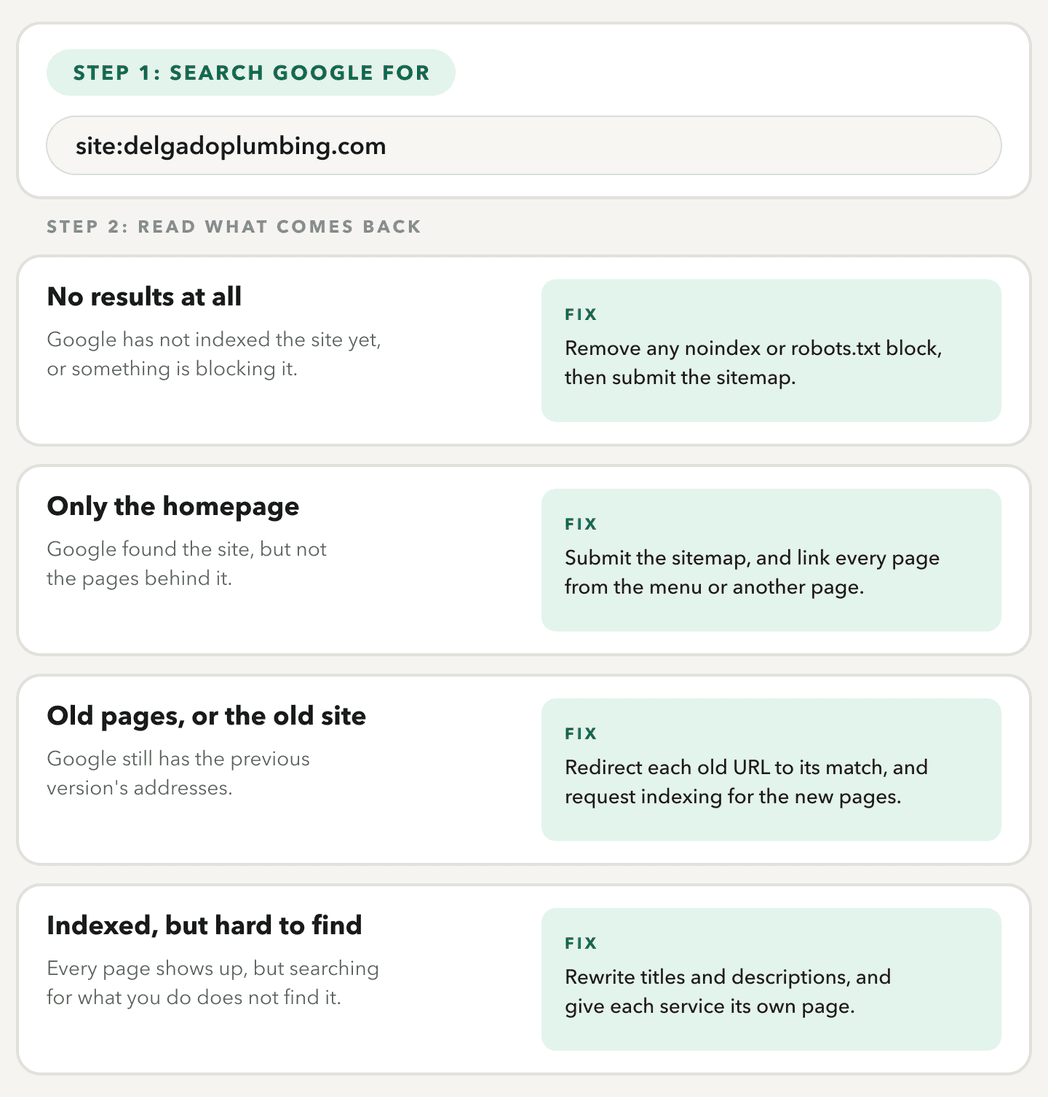
The "site:" search is a quick check, and Google says its list is not always complete. For the full picture, Search Console's Page indexing report shows which pages are indexed and why the others are not.
The first three cases come down to how the site was set up and launched. The fourth is about the pages themselves. And if you serve a local area, there is a third layer beyond the site. The fixes below follow that order.
Why Is My Website Not Showing Up on Google at All?
If the "site:" search returns nothing, only the homepage, or your old pages, the cause is usually in how the site was set up and launched. These are settings, not content, and most are quick to change once you know where to look.
- A "noindex" setting. Many sites are kept out of Google while they are being built. WordPress has a setting called "Discourage search engines from indexing this site", and builders like Wix and Squarespace have their own versions. If it was never switched off, every page is asking Google not to list it.
- A robots.txt block. Robots.txt is a small file at the root of the site that tells crawlers where they may go. A site under construction often blocks everything. If that file came along at launch, Google is turned away at the door.
- No sitemap, and nothing links to the site. Google finds pages through links and sitemaps. A new domain with neither can go unnoticed for a while.
- More than one version of the domain. If the site loads both with and without "www", or on both "http" and "https", Google may treat them as separate sites or index the wrong one. One version should be the real one, and the others should redirect to it.
- Old addresses from a redesign. If the old site's pages moved, Google still has the old addresses. Google recommends a permanent (301 or 308) redirect from each old address to its match, kept for at least a year, and warns against sending them all to the homepage. The redesign checklist shows a redirect map.
How to Get Your Website on Google
Once nothing is blocking the site, these steps tell Google it exists and let you watch what happens next.
- Verify the site in Google Search Console. Verifying the whole domain covers every version of it, with and without "www".
- Submit a sitemap. Most platforms create one for you, often at /sitemap.xml. Paste its address into the Sitemaps report.
- Inspect your key pages. The URL Inspection tool shows whether a page is indexed, and its "Request indexing" button asks Google to look at it.
- Check the Page indexing report a week or two later. It lists the pages Google left out, with the reason for each.
How long does it take for a new website to show up on Google? There is no fixed time, and Google does not promise one. Requesting indexing does not guarantee it either. What these steps do is remove every reason for Google not to find the site.
If It Is Indexed but Nobody Finds It
If the "site:" search shows all your pages, Google has done its part. The site is indexed, and it is not ranking for the searches that matter. Often it shows up for the business name and nothing else. That is not a settings problem. It is about what is on the pages, and this is where search engine optimization (SEO) is built into the site itself.
Here is the same page as a search result, before and after.
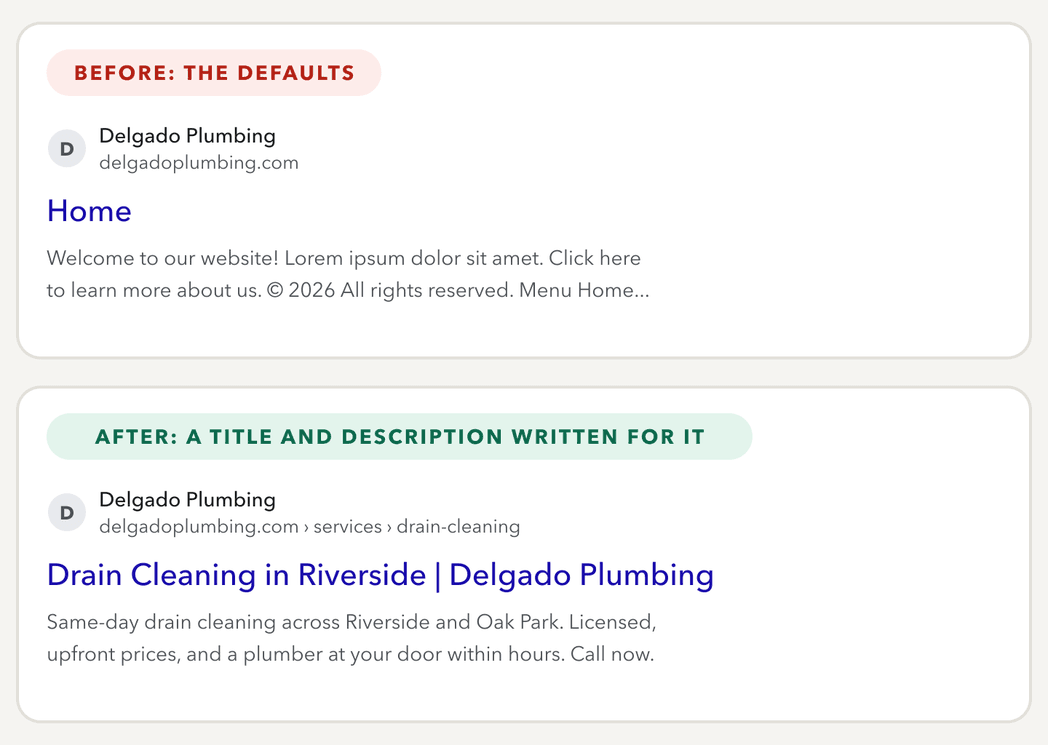
Each choice is there for a reason.
- The title names the service and the place. "Home" tells nobody anything. The title is the largest text in a search result and one of the clearest signals of what the page is about.
- The description is written for a person. Without one, Google pulls text from the page, which can mean placeholder copy or a footer. Google mostly builds snippets from the page itself and uses a written description when it describes the page better, so write a good one.
- The service has its own page and address. A single page listing every service competes for every search at once. A page for drain cleaning, at /services/drain-cleaning, can answer that search directly.
- The words match what people type. Customers search "drain cleaning", not "comprehensive drainage solutions".
The same thinking runs through the rest of the build.
- One main heading per page that says what the page is about, with smaller headings under it.
- Alt text on images. A short description of each image helps Google understand what it shows, and it is what screen readers read aloud.
- Links between your own pages, so Google and visitors can reach every service from the menu and from related pages.
- Structured data where it fits. Code that tells Google a page is about a local business, a service or an article, with its hours, address or date.
- Speed and phones. Images sized for the screen, nothing loading that the page does not need, and a layout that works on a phone, where many customers will see it first.
- Content that answers real searches. A page that explains what you do, where, and for whom gives Google something to rank.
Beyond Your Website
Some of what decides your ranking is not on your site at all. This matters most for local businesses.
- Your Google Business Profile. This free listing is what appears in the map pack and on the right side of Google for your name. Google says local results rest on three things: relevance to the search, distance from the searcher, and prominence, meaning how well-known the business is. Fill in every field, choose the right categories, add photos, and link it to your site.
- Reviews. Google says more reviews and positive ratings can help local ranking. Ask happy customers, and reply to the reviews you get.
- Consistent listings. Your name, address and phone number should match everywhere they appear: the profile, the site, and directories you are already in.
- Backlinks you earn. Links from local organizations, partners, suppliers and press help Google find you and trust you. Buying links goes against Google's spam policies and can hurt a site, so earn them instead.
Google says there is no way to pay for a better local ranking, so all of this is built up over time.
What You Can Do Yourself, and When to Call an Expert
Plenty of this is within reach for any owner. The rest takes experience, time and tools. Here is where the line falls for each part of the job.
| The job | What you can do yourself | When it is worth calling an expert |
|---|---|---|
| Checking where you stand | Run a "site:" search, verify Search Console and read the Page indexing report | Search Console shows errors you do not understand, or pages stay out of the index for weeks |
| Build settings | Switch off a "noindex" setting and submit the sitemap | The domain setup is tangled, with several versions of the site or a move between hosts |
| A redesign | Make a list of every old page address before launch | Addresses changed and traffic dropped, so every redirect needs mapping and testing |
| The pages themselves | Write a clear title and description for your homepage and main services | Pages are indexed but do not rank for what you do, or every service sits on one page with no room to grow |
| Local search | Set up and fill in your Google Business Profile, and ask customers for reviews | You want to show up in the map pack and beyond your own name, and need a plan across the site, the profile and your listings |
Whoever you hire, ask them these questions.
- Will you check the build's settings, verify Search Console and submit the sitemap at launch?
- Will every page have its own title, description and heading, written for a real search?
- If addresses change, will you map and test every redirect?
- Will we own and have access to Search Console, analytics and our Google Business Profile?
- What are you promising? A good answer is a clear plan and honest reporting. Be wary of anyone who guarantees a ranking, because nobody controls that but Google.
Where to go from here
If your site launched and Google cannot find it, or it shows up for your name and nothing else, I can help with both. I check the build's settings, set up Search Console and the sitemap, and build the pages, titles and structure around what your customers actually search. See how I approach website design, or tell me about your site.
Questions People Ask
The Service Behind This
Launched a site Google cannot find?