

MSP Website Design: What to Say Beyond Risk and Compliance
Most MSP websites say the same thing, so buyers cannot tell them apart. Find what is true about your company that a competitor cannot claim, build the homepage around it, and put proof right under every promise.
Every MSP Website Says the Same Thing
Open five MSP websites in a row and read the first line of each. You will probably see some mix of "secure", "reliable", "24/7 support" and "we understand risk and compliance". Every one of those is true, and none of them helps a buyer choose.
That is the problem with most MSP website design. The site looks professional, the services are all listed, and a buyer still cannot tell why they should call you instead of the next company in the search results. So they compare on price, or they do not call at all.
This guide is for MSP owners and the people they hand the website to. It covers how to tell whether your site has this problem, how to find what is actually different about your company, how to prove it, and how to get the site found. Along the way, one generic homepage gets rewritten three ways.
The Short Answer
- Lead with what is true about you, not your service list. A specialty, a service model, a local team, a track record. Which one depends on your company, and there is no single formula.
- Make promises you can prove. "Secure and reliable" is a claim anyone can make. "A named engineer and response times in the contract" is one a buyer can check.
- Put the proof right under the promise. Case studies, a sample report, the names of the people who will answer the phone.
- Say who you are for. An MSP for 20-person law offices is easier to choose than an MSP for everyone.
- Design comes after the words. A template or a custom build both work once you know what the site has to say.
- Then build it to be found. A page for each service, titles that name the service and the area, and a complete Google Business Profile.
First, the Test: Could a Competitor Say It?
Here is a simple test for every line on your homepage. Imagine your biggest local competitor's logo on top of it. If the sentence still works, it is not telling the buyer anything about you.
"We understand risk and compliance" passes for everyone, so it fails the test. So do "proactive", "trusted partner" and "solutions". They are not wrong. They are just the minimum a buyer expects, the way a restaurant does not advertise that it has chairs.
If most of your homepage fails, the fix is not better wording. It is finding something true to say.
Start With Your Buyers, Not a Formula
Most advice on MSP websites hands you a formula: lead with pain points, add a statistic, show a badge. The trouble is that a formula every MSP follows produces sites that sound alike again, just in a new way. What sets a site apart is what sets the company apart, and that is different for every MSP.
So start with who actually hires you. Some buyers are leaving a provider that stopped answering. Switching is common. In an Analysys Mason survey of 413 US businesses, 43% said they had moved to a new IT service provider during 2021. A 2022 survey by Action1, a patch management vendor, found nearly one in four small and mid-sized businesses looking to replace theirs. But switchers are only one kind of buyer. Others are outsourcing IT for the first time, after outgrowing the owner's nephew. Others have an IT person and want backup. Others face an audit or a cyber insurance questionnaire and need someone who can answer it.
Each of those buyers needs to hear something different. The right message for your site depends on which of them you win most often, and why they stay.
On Techromatic, a managed IT company I worked with, the message was built on what its own customers showed during onboarding: who was actually arriving at the IT site, and why. Its own sales lead had opened with "we understand risk and compliance", which is table stakes. The answer the site landed on came from Techromatic's customers and Techromatic's record. Another MSP has different customers and a different situation, so its answer will be different too.
Find What Is True About You
Before writing a headline, find the two or three things that are true about your company and hard for a competitor to claim. The most reliable source is your best clients. Ask them why they chose you, and why they stay. Their answers are usually more specific than anything in a brainstorm.
The answers tend to fall into a few kinds. Most MSPs have one or two of these that are genuinely theirs.
| What sets you apart | The question to ask yourself | How it shows on the site |
|---|---|---|
| A specialty | Do most of our best clients share a field? | Industry pages, that field's language, its software named |
| A service model | Do we fully manage, back up in-house IT, or both? | Separate paths for each kind of buyer |
| Who answers | Do clients get a named engineer or a small, steady team? | Real names and photos, not a ticket form |
| Place | Can we be on site the same day? | The area served, with on-site terms in writing |
| Track record | How long do clients stay with us? | Client tenure, long-running case studies |
| Openness | Can we publish how pricing or contracts work? | Pricing approach and contract terms on the page |
| An outcome | Do we get clients through audits or insurance renewals? | The documents you prepare, with a sample |
Pick what is both true and what your best buyers care about. A specialty you cannot back with clients will not convince anyone, and an outcome nobody asks for will not sell. One honest angle, said clearly, is worth more than all seven said loosely.
This is the hardest step to do from the inside. Teams describe themselves the way their competitors do, and clients often tell an outsider things they never say to their provider. It is also the step that decides everything after it, so it is the one most worth getting help with.
Turn Each Claim Into Proof
Once you know what sets you apart, say it in a form a buyer can check. Usually that means a number, a name, a process or a document.
| What most MSPs say | What a buyer can check | The proof that backs it |
|---|---|---|
| Fast, responsive support | Response times by priority, written into the contract | The contract language, on the page |
| Proactive IT management | A monthly report on patches, backups and open issues | A redacted sample report |
| We understand compliance | We prepare the documents your auditor or insurer asks for | A case study from your industry |
| A trusted partner | One named engineer who knows your setup | Their name and photo |
| Industry expertise | We run IT for dental practices and nothing else | Client logos or case studies from that field |
You will not have proof for everything, and that is fine. A site with two promises it can prove beats one with ten it cannot.
A Worked Example: One Homepage, Three Honest Rewrites
Here is a fictional MSP's homepage hero, and three ways to rewrite it. Each rewrite rests on a different truth about the company. None of them is the right answer for every MSP. The right one is whichever is true for yours.
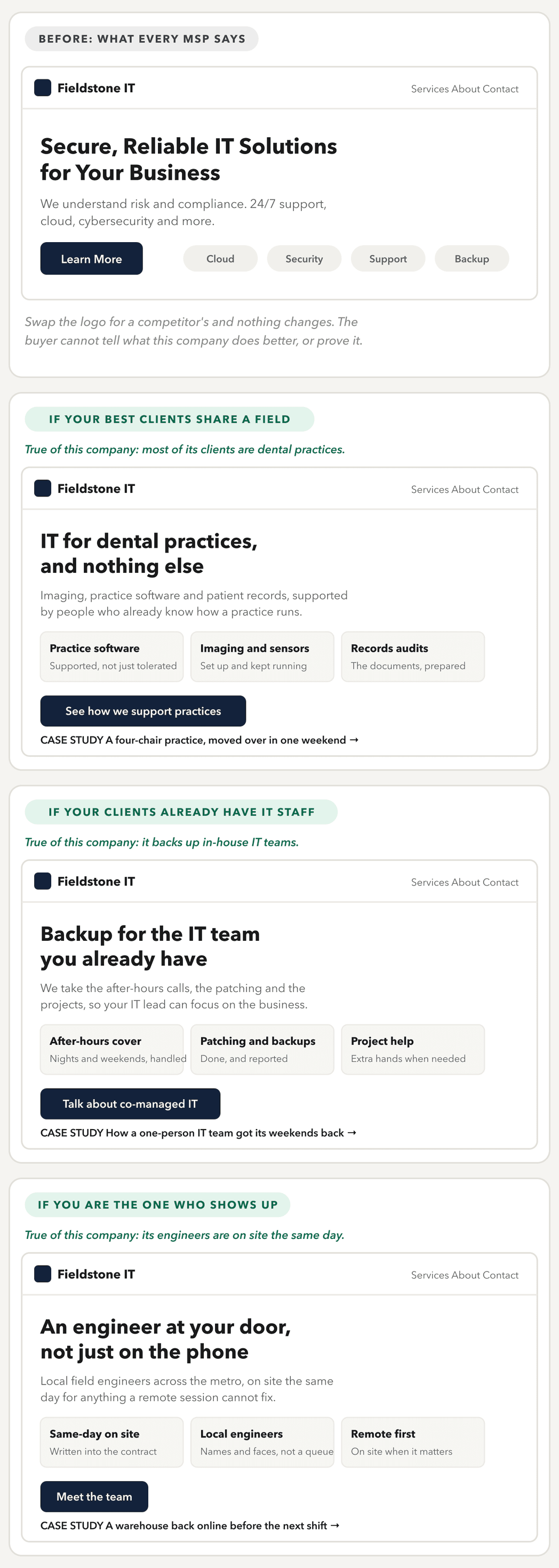
The before fails the competitor test in every line. The three rewrites pass it, each in its own way.
- The specialist speaks the field's language, names its software, and points to a case study from that field. A dental office manager recognizes their own day in it. A law firm reading it knows to keep looking, which saves both sides a sales call.
- The co-managed provider talks to a different buyer entirely: an IT lead who does not want to be replaced. Its promises are about relief, not takeover, and its next step is a conversation about how the two teams would split the work.
- The local team makes presence the promise, and puts the same-day terms in the contract so the buyer can check them.
What the three share is the structure, not the message. Each says who it is for, makes two or three promises a buyer could ask to see, offers a small next step, and puts proof right under the promise. Notice what is missing too: no stock photo of a server room, and no paragraph about how long the company has been in business. Those can live further down the page.
The Pages an MSP Website Needs
Once the message is settled, the structure follows from it. Most MSPs need fewer pages than they think, as long as each one does a job.
- Home. What sets you apart, who you serve, two or three provable promises, proof and one clear next step. This is the page most worth getting right.
- Services. What is included in managed IT, and what costs extra. If you sell security, cloud or compliance work separately, give each its own page so it can answer its own questions.
- Industries, if you specialize. One page per field you actually serve, with that field's language and its own case study. Skip it if you serve everyone.
- Case studies. The before, what you did, and what changed, ideally with the client named. These do more selling than any other page.
- How onboarding works. For a buyer leaving another provider, the switch is the part they fear most. A plain explanation of the first 30 days answers that fear directly.
- About. The people. A buyer choosing an MSP is choosing who answers the phone.
- Contact. A short form, a phone number, and what happens after they get in touch.
Getting Your MSP Website Found
A clear message only works if buyers reach it. Most MSPs win business locally, so search engine optimization (SEO) for an MSP website is mostly about two things: pages built for the searches buyers actually type, and a strong presence in Google's local results.
- A page for each service people search for. "Managed IT services", "cybersecurity for small business" and "co-managed IT" are different searches. One services page that lists them all competes for every search at once. A page for each can answer its search directly.
- Titles and descriptions that name the service and the place. "Managed IT Services for Law Firms in Tampa" tells Google and the buyer exactly what the page is. "Home" or "Services" tells nobody anything.
- Industry and area pages only where they are real. A page for each field you serve, with its own case study, helps the right buyers find you. A page for every town within 50 miles, with the same text and the name swapped, does not.
- Structured data. Code that tells Google the site belongs to a local business, with its address, hours and services, so it can read the page without guessing.
- A complete Google Business Profile. For a search like "managed IT near me", the map results come from your profile as much as your site. Google says local results rest on relevance, distance and prominence, and that reviews can help. Ask your best clients for a review, in their own words about why they chose you.
- Links you earn. A case study a client links to, a local business association listing, a talk at a chamber event. Links from real organizations help Google find and trust the site. Buying them goes against Google's spam policies.
- Case studies as content. Each one is a page about a real problem in a real industry, which is exactly what a worried buyer searches for.
None of this guarantees a position, and nobody can promise one. If your site is live but buyers cannot find it, this guide to diagnosing a website that is not showing up on Google walks through the checks in order.
Templates, Custom Builds and the Best MSP Websites
If you have searched for an MSP website template, you have probably seen several that look polished and cost little. A template is a fine starting point, as long as you know what it does not give you. It gives you a layout. It does not give you the words, and the words are the hard part. A template filled with the same "secure, reliable, proactive" copy will look like every other site built from it.
A custom build earns its cost when the site has to do something the template cannot. That might be a pricing estimator, an onboarding checklist, a client portal link or separate sections for separate services. It also earns its cost when the brand itself needs work, so the site and the identity are designed together.
The same test applies to the best MSP websites you will find in examples lists. Do not copy the layout. Look at the first sentence, and ask whether a competitor could say it. The examples worth learning from are the ones where the answer is no.
When to Bring In Help
You can do some of this yourself. Running the competitor test on your homepage, gathering your proof and collecting two case studies needs no designer at all. If your site is already easy to edit, those changes alone will help.
If you are comparing MSP website design services, the reasons below are when outside help pays for itself.
It is time to bring in a designer when:
- You cannot see what sets you apart, or you see several things and cannot choose. An outside interviewer often hears it faster than the team that lives with it.
- The site cannot be edited without breaking it, so every change waits on someone.
- You sell more than one kind of service and the site blurs them together.
- The brand looks dated next to the clients you want to win.
- You need features a template cannot do, like an estimator or a connection to your CRM.
- The site is live but does not show up for the services and the area you cover.
Whoever you hire, ask them these questions.
- How will you find out what we do differently, and who will you talk to?
- Who writes the copy, and is it in the quote?
- Will we be able to add case studies and staff ourselves, without breaking the layout?
- Will the forms send leads straight into our CRM or ticketing system?
- How will each service page be set up to be found, and what will you report on afterward?
- Will we own the site, the domain and every file?
Where to go from here
If your site sounds like every other MSP's, that is the kind of project I take on. I start by finding what you do that competitors cannot claim, and then design and build the site around it. See how I approach website design, or tell me about your company.
If you run an agency that builds sites for MSPs, I also work white label, under your name and inside your process.
Questions People Ask
The Service Behind This
Does your site sound like every other MSP?