

Restaurant SEO: How Guests Find and Check You on Google
Most guests look up a new restaurant on Google before they go. Restaurant SEO is making that look-up go well, with a complete Google Business Profile, reviews you ask for and answer, and a website Google can read. Nobody can pay Google for a better local ranking.
Google Writes Part of Your Listing for You
Google's help pages explain how a business listing is built, and their example is a restaurant. A guest who searches for one sees what the owner added, like the hours and the address. They might also see a menu link and photos of meals the owner never added, because Google pulls from other sources too.
So restaurant SEO starts with a listing you only partly control. The job is to fill in what you can, keep the rest accurate, and look like a place worth going when a guest checks you.
And most guests do check. In TouchBistro's survey of 1,500 US diners, 64% always or often run a Google search before choosing a new restaurant, and 67% check its online reviews. Fewer find new restaurants through search in the first place. In a 2025 Toast survey, 16% found them through a search engine, and word of mouth led at 38%. What nine diner surveys agree on puts these side by side with seven more.
The pages that rank for restaurant SEO are mostly written by companies that sell to restaurants. This guide works from Google's own help pages instead, and most of what it covers costs nothing but time.
The Short Answer
- Google ranks nearby restaurants on relevance, distance and prominence. Distance is fixed, so the work is in the other two.
- Your Google Business Profile does most of the work. It is free. Choose the most specific category, set every kind of hours, link your own menu and your booking and ordering tools, and add real photos.
- Google builds your listing from three sources. It uses what you add, what guests add and what it finds on the web, including your website. So all three have to agree.
- Reviews come from asking. Ask happy guests with the link or QR code Google gives you, and never offer anything in exchange. Reply to the reviews you get.
- Your website backs it all up. Put the menu on it as text, keep the hours and address the same as the profile, and make sure Google can find it.
How Google Ranks Restaurants Nearby
Most restaurant SEO advice comes back to how Google picks which places to show. Google publishes the answer, at least in outline. Local results rest mainly on three factors.
| Factor | What Google means | What you can do about it |
|---|---|---|
| Relevance | How well your profile matches what someone searched | Fill in the profile completely, choose the most specific category and put the menu on Google |
| Distance | How far you are from the person searching | Nothing, beyond an accurate address and map pin |
| Prominence | How well known the restaurant is, including how many reviews it has and how many websites link to it | Ask happy guests for reviews, and earn mentions in local press, guides and lists |
So local SEO for restaurants comes down to relevance and prominence. Google also says there is no way to request or pay for a better local ranking.
Where Your Google Listing Comes From
Google's help pages name the sources behind a listing. They are what the owner adds and what users contribute, such as reviews, photos and factual edits. Google also uses what it finds on the web, including the restaurant's own website. Here is how that adds up on a made-up restaurant.
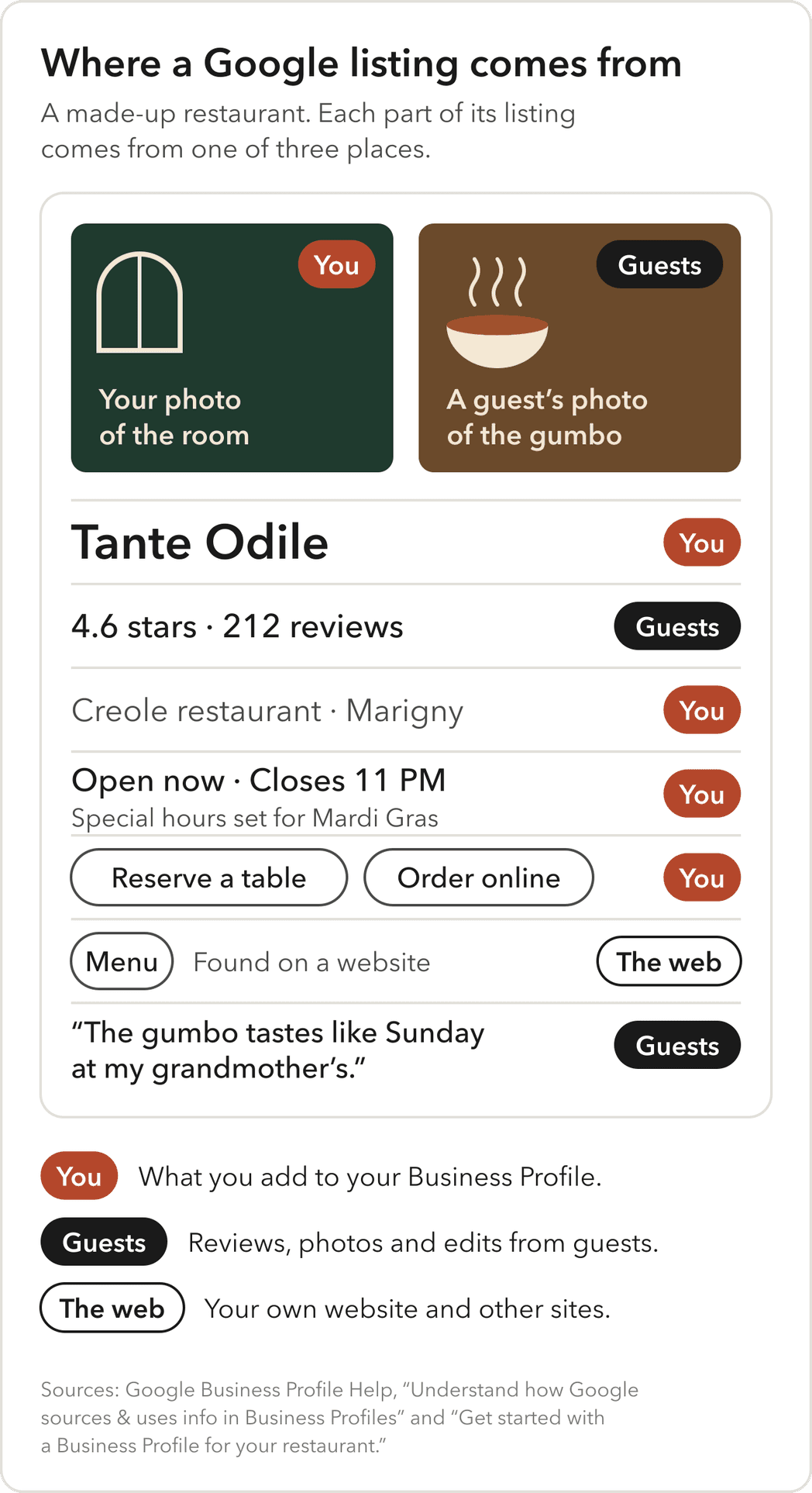
That has two consequences for an owner.
- Check the profile every month. Guests can suggest edits to facts such as the phone number, and other sources can add a menu link. Google's advice to owners who hire an outside company is to review the profile monthly, including the photos and hours. Do the same check when you run it yourself.
- Make your website the source. When your website, the profile and your other listings agree, Google has one story to tell. When they disagree, guests can see the wrong one.
Google Business Profile for Restaurants: What to Fill In
The profile is free, and Google has a setup guide written for restaurants. Before you start, search for your restaurant on Google Maps. If it is already listed, request ownership of that listing instead of making a new one. Then verify it, so Google knows you are allowed to manage it.
These are the fields that matter most for a restaurant.
| Field | What to set | Why it matters |
|---|---|---|
| Name | Your real name, exactly as it is on the sign | Google does not permit extra words in the name, and can suspend a profile for it |
| Category | The most specific category that fits, such as Creole restaurant, and as few others as you need | Google says to pick categories that finish the sentence "This business IS a," and it adds the general ones itself |
| Hours | Regular hours, separate hours for takeout and delivery, and special hours for holidays and events | Guests see whether you are open right now, and Google says complete, accurate information helps you show up |
| Menu | Your full menu, typed into Google's menu editor or linked from your own website | A menu link cannot go straight to an ordering or delivery service, and a list of popular items is not a menu |
| Reservations and ordering | Your booking provider and your preferred ordering link | Guests can book a table or start an order straight from the listing |
| Photos | The outside, the room, your dishes and the menu | Google says an exterior photo helps guests recognize the place when they arrive |
| Attributes | Details such as parking and Wi-Fi | They answer a guest's practical questions before anyone has to call |
The menu rule is worth a second look. Pointing the menu button at a delivery app can seem easiest, but Google's guidelines do not allow it. Link to the menu on your own website, or type it into Google's editor. How to put a menu online covers why the menu on your site should be text, not a PDF.
How to Get More Google Reviews
Most guests check reviews before choosing a new restaurant, and Google is the top place they read them. In TouchBistro's survey, 43% of diners had read Google restaurant reviews within the past three months, against 31% on Yelp. Google also counts reviews toward prominence.
Getting more of them comes down to three habits.
- Ask happy guests. When a table tells you they loved it, ask them to say so on Google. Google gives you a review link and QR code, so keep the code on a small card your staff can hand over.
- Never trade anything for a review. Google says offering incentives, like free or discounted goods, to post, change or remove a review is strictly prohibited. A free dessert for five stars counts.
- Reply briefly and specifically. Google's advice is to keep replies short, leave out promotions and answer what the guest actually said. For a bad review, apologize where it is fair, explain what you can, and offer to talk by phone or email.
Here is the difference on a typical complaint. The review reads, "Waited 40 minutes for our table, even with a reservation. The gumbo was worth it, barely."
| A reply that says nothing | A reply that helps |
|---|---|
| "Thank you for your feedback! We hope to see you again soon." | "Sorry about the wait on Saturday. A large party ran long, and we should have told you at the door. Glad the gumbo made up for some of it. Odile, owner" |
The second reply answers the complaint, says what went wrong and is signed by a person. Replies are public, so every guest who reads the review reads the reply too.
What Your Website Adds
Google reads your website when it builds your listing, so the site is part of restaurant SEO too. It also answers what a profile cannot, like what the room feels like and what is on the menu tonight. How your website and your Google listing work together covers keeping the menu and hours in one place. Three more things help with search.
- A page title that says what you serve and where. For example, "Tante Odile | Creole Restaurant in the Marigny, New Orleans." Google lists the page title first among the sources it uses for the link in search results.
- Restaurant structured data. This is a short block of code that states your hours, cuisine, price range and menu link in a format Google reads. Google's own documentation uses a restaurant as its example. It helps Google read the facts, and Google does not guarantee it will change how you appear.
- A site Google can find. If your site does not show up when you search your own name, this guide to getting a new website on Google walks through why.
Listings Beyond Google
Guests use other maps and apps too. Apple Maps listings are managed through Apple Business, and Yelp and Tripadvisor carry their own reviews. Your reservation page on Resy, OpenTable or Tock and your delivery apps show your hours as well.
Google also builds listings partly from licensed data from other companies. That is one more reason to fix an old directory listing with the wrong phone number. Keep every listing matching your website. The four places a restaurant's brand has to match covers keeping them consistent in look as well.
Restaurant SEO Pitches to Skip
Some restaurant SEO pitches cost money and do little. Google's own pages rule out most of these.
- A promised spot on the map. Google says outside companies cannot promise a ranking or directly influence one.
- A name with keywords added. "Tante Odile Best Gumbo New Orleans" is the kind of name that gets a profile suspended.
- Reviews for sale. Any service that gets reviews with discounts, gifts or payments breaks the rule above.
- A blog before the basics. A blog is optional for a restaurant, and Google's guidance on local ranking does not mention one. Start with the profile, the menu and reviews.
How to Tell If It Is Working
Your profile has a Performance report. Google names three numbers for restaurants to watch, which are searches, menu clicks and bookings. The report also counts calls, direction requests and website clicks. If you run Google Ads, the report counts those visits too.
Start with the searches, because Google shows the actual search terms people used before they found you. If most of them are your name, guests are checking a restaurant they already heard about. If more of them are dishes or cuisines, like "gumbo near me," Google is showing you to people looking for what you serve. Both are worth watching from month to month.
Then look at what guests did. Direction requests and calls are the closest the report comes to a guest at the door. Menu clicks show interest. Bookings only appear if you take reservations through a provider connected to Google.
When to Bring In Help
An owner can set up and run a Google Business Profile. Google itself says it does not take long to understand how the profile works. It is worth bringing in help when:
- The website cannot be updated quickly, or the menu on it is a PDF or a photo.
- Your hours and menu differ across Google, your site and the apps, and nobody has time to fix them all.
- You are opening, moving or changing the concept, and every listing has to change at once.
- A former manager or vendor still controls the profile.
Four questions for anyone you hire:
- Will the profile stay in our name? Google says only a profile's owners control who has access, so make sure the owner is you.
- What exactly will you change? Ask for the list in writing, with each cost. Google advises getting an agreement that spells out the services and what they cost.
- Who writes the review replies? Google suggests signing replies with a name, so whoever writes them should sound like you.
- What will you report each month? Searches, calls, direction requests, menu clicks and bookings all come from your own profile, so you can check them yourself.
Where to go from here
If your Google listing, your website and your menu do not agree, or you are opening and starting from nothing, I would love to hear about it. My restaurant package handles them as one job, with your Business Profile checked and fixed with you, your listings showing the same facts at launch and a site Google can read. I cannot promise rankings, and I would doubt anyone who did. See my restaurant website design package, or tell me about your restaurant.
Questions People Ask
The Services Behind This
Do Google, your website and your menu agree?